
AI Agents in Marketing Workflows: Design, Control and Costs

Since 2 August 2026, Article 50 of the EU AI Act sets transparency rules for AI-generated content. A marketing team that lets an AI agent publish now needs that agent to follow two sets of rules: the brand guidelines and the rules on when content has to be labelled. Who checks the second set depends on how the workflow was designed.
This article is for marketing leads and for the technical people who will build or integrate the system. Where it helps, it draws on what our own team has learned working with AI agents in development and content work during 2026. It covers the design of an AI marketing agent workflow: when a fixed workflow is enough and when you need an agent, where people approve, how to stop a run that goes wrong and what the cost of each run is made of.
What “agent” means here
The word “agent” covers two different things in current offers. Anthropic, in its guide Building effective agents, separates them:
- Workflows are systems where models and tools are orchestrated through predefined code paths. You decide the steps; the model does the work inside each step.
- Agents are systems where the model directs its own process and decides which tool to use next.
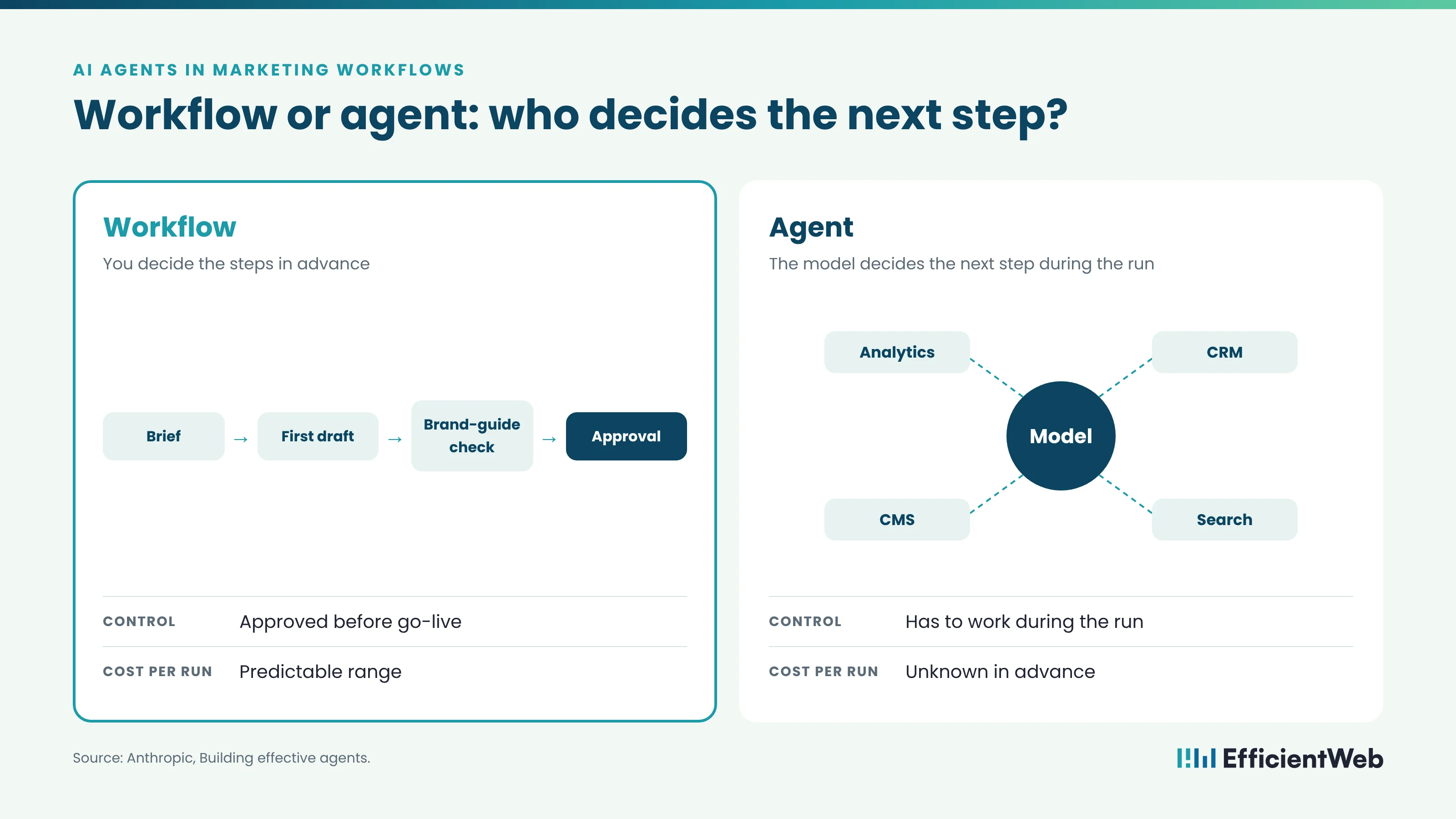
The difference matters for marketing because it decides what you can approve in advance. A workflow can be reviewed once, step by step, before it goes live. An agent’s path is decided at run time, so control has to work during the run.
The same guide recommends starting with the simplest solution and adding complexity only when it improves the result. It also states that agentic systems trade latency and cost for better task performance. That trade-off is the reason to ask, for every marketing task, whether it needs an agent at all.
Five workflow patterns, translated into marketing tasks
Anthropic describes five workflow patterns. Each has a direct use in marketing.
Prompt chaining. The task is split into steps, and each step works on the output of the previous one. Marketing example: brief → first draft → check against the brand guide → corrected draft. You can add a check between steps, so a draft that fails the brand check does not move on.
Routing. The model classifies the input and sends it to the right path. Marketing example: messages from a contact form are classified as sales lead, support request, partnership offer or spam, and each goes to a different queue with a different follow-up.
Parallelisation. Several model calls run at the same time, either on different parts of the task or on the same task several times. Marketing example: ten headline variants for an ad set generated in parallel, then each scored separately against the same criteria.
Orchestrator and workers. One model breaks the task into subtasks and hands them to other calls, then combines the results. Marketing example: research for a campaign split into competitor messaging, search demand for the topic and patterns in your own CRM data.
Evaluator and optimiser. One call writes, another evaluates against criteria, and the loop repeats until the text passes or a limit is reached. Marketing example: product descriptions checked against length, tone, banned claims and required product attributes.
When you need an agent. An agent fits tasks where the next step depends on what the previous step found and the path cannot be written down in advance. Marketing example: finding the cause of a drop in conversions, where each finding (a tracking change, a slower checkout, a campaign that ended) points to a different next check. If you can draw the steps on a whiteboard before the run, a workflow will do the job with more predictable cost and output.
Designing an AI marketing agent workflow: from process to tools
Start from the process, not from the model.
- Map the current process. For one task, write down the input, each step, the output and who does each step today. Note where someone makes a judgement and where someone only moves data from one system to another.
- List the systems involved. CMS, CRM, email platform, ad accounts, analytics, digital asset library. For each one, note whether it has an API and what the API allows.
- Decide the permission level for each system. Four levels are enough to describe it: read – the system can look up data; draft – it can create content that a person has to approve; publish – it can make content visible to customers; spend – it can change budgets or bids.
- Tie every write permission to a checkpoint. If the system can publish or spend, the design has to say who approves, at which moment, and what happens when approval does not come within a set time.
- Decide who can run it. Permissions apply to people as well as to the system: which roles in the company can start a given workflow, and on which brands, markets or accounts.
- Keep the rules in one maintained document. The brand guide, the list of claims you must not make, product naming and tone go into one document that every run reads. In our team, maintained project guidelines proved more useful than records of individual sessions: the rules apply to every run, whoever started it and whichever model it uses.
A workflow designed this way can start with read and draft permissions only, and move individual steps to publish once their output has a record of passing review.
Control: checkpoints, limits and logs
Anthropic’s guide lists the risk directly: the autonomy of agents means higher costs and the potential for compounding errors. It recommends testing in sandboxed environments, guardrails, points where the agent pauses for human feedback and stopping conditions such as a maximum number of iterations. For a marketing workflow, that translates into five controls.
Human checkpoints. Place them before anything a customer will see and before anything that spends money: publishing a page, sending an email campaign, changing an ad budget, replying to a customer in your name. The person at the checkpoint needs the context to judge, not only the final text: the brief, the sources the system used and the checks it ran.
The number of checkpoints matters as much as their place. In our development work with multi-agent workflows, a setup that asked people questions in the middle of the work slowed everything down. What worked was two gates: the person approves the plan at the start, and accepts the result at the end, with evidence. A run that only reports “done” without evidence is not accepted. In marketing, the plan is the approved brief and outline, and the evidence is the list of sources, the result of the brand-guide check and the claims that were verified.
Stopping conditions. Every run needs a limit on the number of iterations and on cost. When the limit is reached, the run stops and hands the task to a person with a note on where it stopped. The same applies when the system cannot reach a tool or gets an error it cannot handle.
Content from outside is data, not instructions. A marketing agent reads text it does not control: competitor pages, contact-form messages, comments, documents from partners. That text can contain instructions, and a model can follow them. In our team, a model asked to translate a document carried out an instruction written inside that document instead of translating it. Two rules follow: the system treats outside content as material to work on, and a step that reads outside content does not get publish or spend permissions without a checkpoint after it.
Testing before production. Run the workflow on past briefs and past data, in an environment where it cannot publish or spend, and compare the output with what your team produced. Keep that set of test cases and run it again after every change to prompts, models or tools.
A log of every run. Record the input, each step, the tools called, the output, the cost of the run and who approved it. Without the log, a wrong claim in a published text cannot be traced back to the step that produced it.
External rules. Three sets apply to marketing content:
- The EU AI Act. Under Article 50(4), deployers that use AI to create deepfakes must disclose that the content is artificially generated or manipulated. The same applies to AI-generated text published to inform the public on matters of public interest, unless the text has undergone human review or editorial control and a person or company holds editorial responsibility for it. The European Commission published guidelines on these obligations on 20 July 2026. Whether a given campaign falls under these rules is a question for your legal team; the workflow’s job is to record which content was AI-generated and who reviewed it.
- Google Search. Google states that using generative AI to create many pages without adding value for users may violate its spam policy on scaled content abuse. A checkpoint before publishing is the place where someone decides whether a page adds value.
- Google Merchant Center. For online stores, AI-generated images must carry metadata that marks them as AI-generated, and AI-generated product titles and descriptions must be labelled separately. A workflow that writes product data has to set these labels.
Costs: what one run is made of
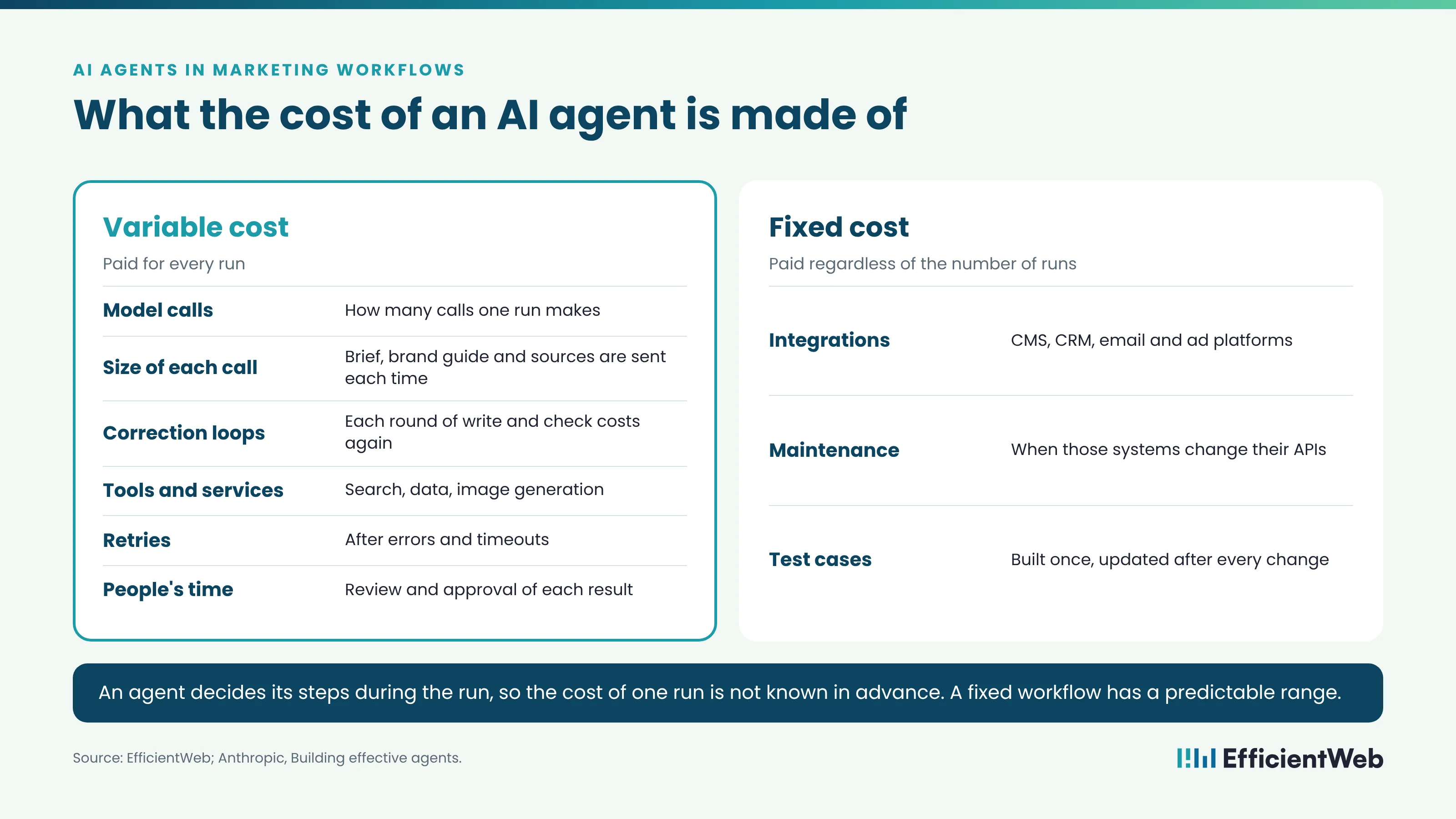
Model prices change, so they do not belong in an article meant to last a year. What stays the same is what the cost is made of.
Variable cost per run:
- the number of model calls in the run,
- the size of each call (the brief, the brand guide and the source material sent with every call count each time),
- the number of iterations in loops such as evaluator and optimiser,
- tool calls and the services behind them (search, data enrichment, image generation),
- retries after errors,
- the time people spend at checkpoints. A workflow that saves an hour of writing and adds twenty minutes of review saves forty minutes, not an hour. In our own content work, time saved on writing with AI came back in review, corrections and polishing. That is why we measure the time from brief to publication, not from brief to first draft.
An agent adds one more factor: the number of steps is not known in advance, so the cost of a run is not known in advance either. A workflow has a fixed number of steps and a predictable cost range.
Fixed and recurring cost:
- building the integrations with your CMS, CRM and ad platforms,
- maintaining them when those systems change their APIs,
- building and updating the set of test cases.
Levers that reduce cost:
- a workflow instead of an agent wherever the steps are known,
- a smaller, cheaper model for classification and routing, and a larger one only for the steps that need it,
- the reasoning level set per step: in our team, running a model at its highest reasoning setting used up usage limits after two requests, and one level lower made a clear difference to how far the limits went,
- the number of agents matched to the task: a single agent for a small task, a team of agents only for a large one. In our tests, one phase of multi-agent work took around twenty minutes because several agents analysed the task and delegated parts of it to each other,
- limits on iterations and on cost per run,
- measuring cost per run from the first day of the pilot, so the monthly estimate is based on your data, not on a price list.
One lever brought less than we expected: shortening instructions and asking for shorter answers. The savings in our tests were smaller than those from choosing the model, the reasoning level and the number of steps.
Where to start
Pick one process with a measurable result, such as the time from brief to first draft or the time to route an incoming lead. Build it as a workflow with read and draft permissions and a checkpoint before anything leaves the team. Measure quality, time and cost per run for a few weeks. Move a step to publish only when its output has a record of passing review, and build an agent only for the part of the work where the steps cannot be planned.
If you want to plan an AI marketing agent workflow for your team, from the process map to permissions and cost limits, see autonomous AI agents and workflows.
FAQ
Do AI-generated marketing materials have to be labelled?
It depends on the content. Under Article 50(4) of the AI Act, deployers must disclose deepfakes, and AI-generated text published to inform the public on matters of public interest unless it has gone through human review or editorial control with someone holding editorial responsibility. The European Commission’s guidelines of 20 July 2026 explain the scope. For online stores, Google Merchant Center has its own labelling rules for AI-generated images and product data. A specific campaign should be assessed by your legal team.
Can an AI agent publish without human approval?
Technically, yes, if it has publish permissions in your CMS or email platform. Whether it should depends on what it publishes and what an error would cost. Content that reaches customers, spends budget or speaks in your company’s name needs a checkpoint until the step has a record of passing review. Even then, the log of every run should show what was published and why.
How do you estimate the monthly cost of an AI agent?
Measure the cost of one run during a pilot: model calls, iterations, tool calls and retries. Multiply it by the number of runs you expect per month and add the time people spend at checkpoints and the cost of maintaining integrations. For an agent, use the range of costs from the pilot, not the average, because the number of steps changes from run to run.