
Scaling WordPress Multisite: One Network, Many Brands, Without the Mess

A company runs eight brand websites. Or a publisher runs eight titles. Each site was built at a different time, by a different team, on a different theme. Then marketing asks for a new promotional block – the same one, on every site.
It gets built eight times. Tested eight times. And when the brand guidelines change next spring, someone opens eight projects instead of one.
WordPress Multisite looks like the obvious fix: one installation, one dashboard, many sites. It can be. But scaling WordPress Multisite well depends on three things most teams only discover after the migration – where the shared design system actually lives, what really slows a network down, and when separate installs are the better call.
Multisite or separate installs: a decision, not a default
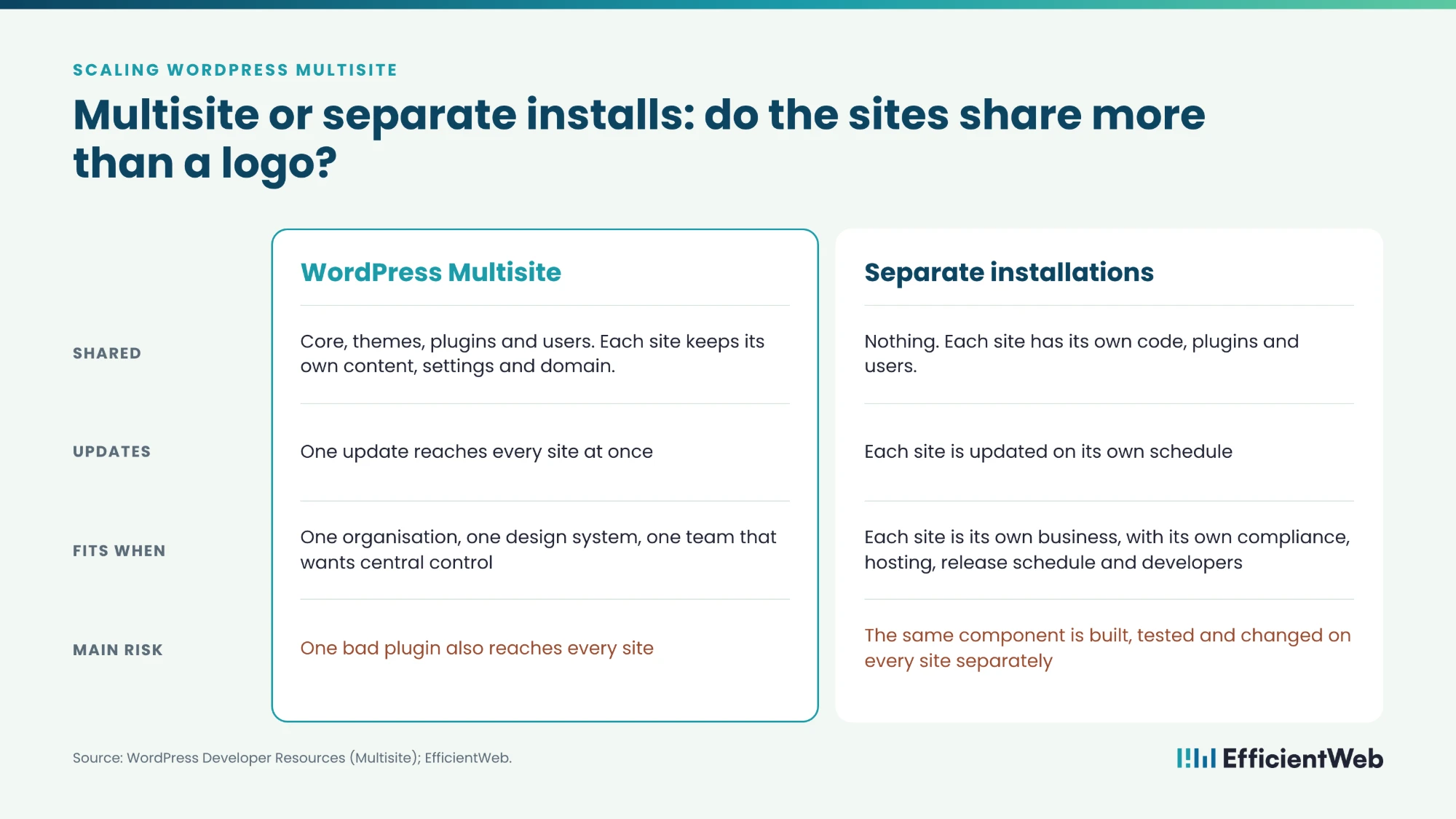
Multisite runs many sites from one WordPress installation. They share the core, the themes, the plugins and the user base. Each site keeps its own content, settings and domain.
That sharing is the whole point, and also the whole risk. One update reaches every site at once. So does one bad plugin.
Multisite makes sense when the sites belong to one organisation, look and behave in a similar way, and are run by one team that wants central control. A group of brands with a common design language fits. So does a publisher running several titles on one editorial platform – the typical case in WordPress for digital publishers.
Separate installations make sense when each site is effectively its own business: its own security and compliance needs, its own release schedule, its own developers, its own performance profile. If one brand needs a different checkout, a different hosting setup and a different team, putting it in the same network only couples things that should stay apart.
The test is simple. Do these sites share more than a logo? If they share a design system, an editorial workflow and a roadmap, a network will save work. If they only share an owner, it will mostly share problems.
Where a shared design system really lives
This is the part that decides whether a network scales or just multiplies work.
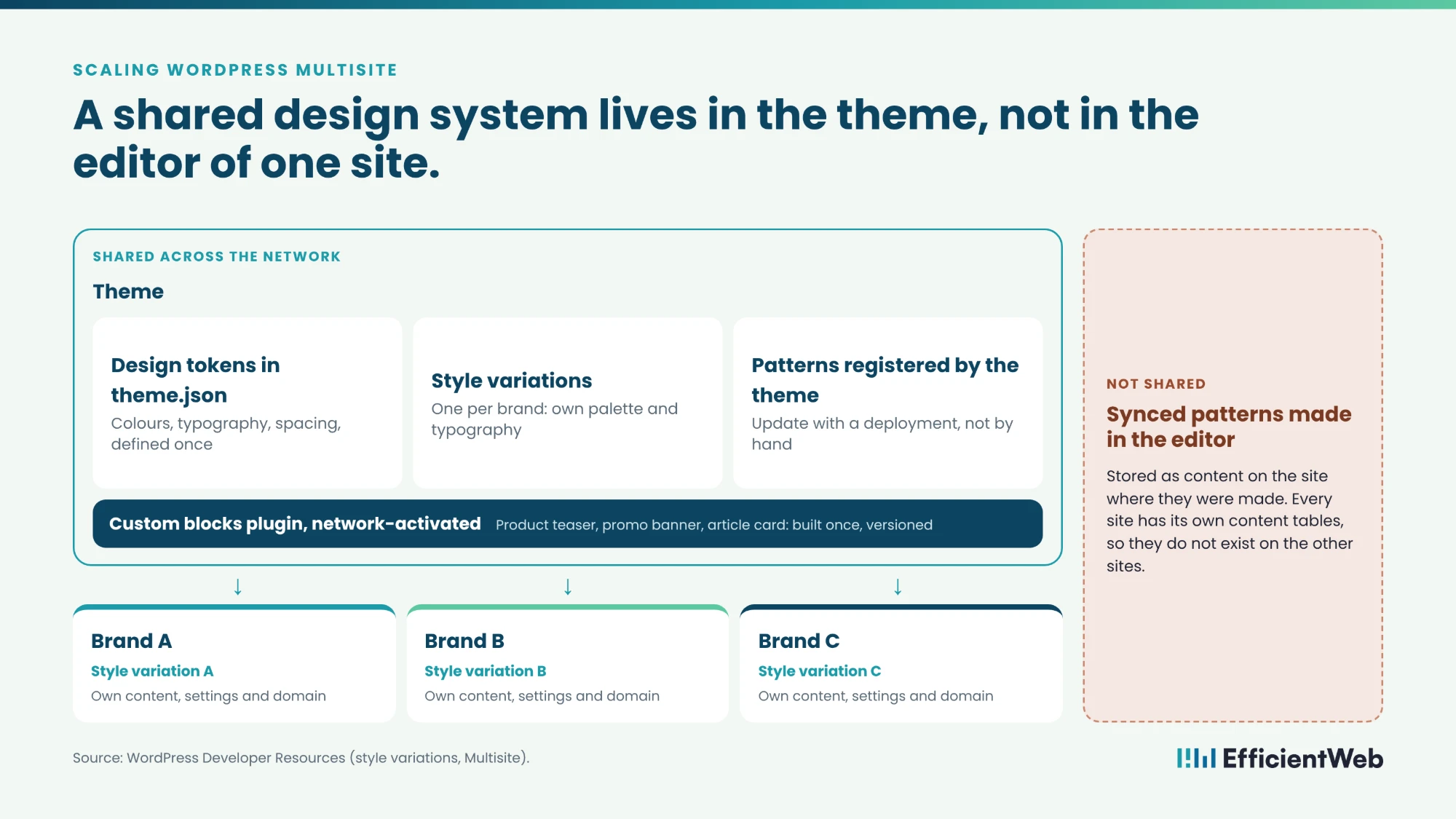
The intuitive approach is to build blocks and patterns in the editor on one site and reuse them everywhere. In WordPress, that does not work out of the box. Synced patterns created in the editor are stored as content on the site where you made them, and pages reference them by an internal ID. Every site in a network has its own content tables, so a synced pattern on one site simply does not exist on another. Sharing it means writing custom synchronisation code or adding a plugin for it.
The layer that is shared across a network is the theme. That is where a multi-brand design system belongs:
- Design tokens in theme.json. Colours, typography, spacing and layout settings defined once, as data.
- Brands as style variations. WordPress lets a theme ship alternative versions of its theme.json as style variations. One theme, one set of components, and each brand switches to its own palette and typography.
- Patterns registered by the theme. Patterns defined in the theme’s code are available on every site that uses it, and they update with a deployment, not by hand.
- Custom blocks as a network-activated plugin. The product teaser, the promotional banner, the article card – built once, versioned, available everywhere.
The result: a new component is built once and reaches all brands with the next release. A rebrand of one brand is a change to one style variation. And editors on every site work with the same, tested building blocks instead of eight slightly different copies. Getting this layer right is the core of WordPress Multisite development for multi-brand organisations – the network itself takes an afternoon to switch on.
What actually slows a network down
Multisite performance problems rarely come from the number of sites alone. They come from what each site carries and from operations that touch all sites at once.
Every site has its own set of tables. Each new site in the network gets its own posts, metadata and options tables, as WordPress VIP’s documentation on multisite database structure shows. That includes its own options table with its own autoloaded settings. A plugin that stores a large amount of autoloaded data is a problem on one site. Activated across fifty sites, it is fifty problems.
The object cache is separated by site – until you flush it. WordPress core already prefixes cache keys with the site ID, so sites in a network do not overwrite each other’s cached data. The real risk is the other direction: operations that clear the cache for the whole network at once. One documented case describes a network of 200 sites where a database upgrade flushed the object cache network-wide under live traffic, causing a performance drop and 503 errors. Upgrades and cache-clearing tasks need to be planned for the whole network, not run as if it were a single site.
Shared users grow with every site. Users live in one table for the whole network, with their roles stored per site. On large networks with many users and many sites, admin screens that list users or sites get heavier, which is why WordPress has a separate notion of a “large network” for its admin counts.
None of this is a reason to avoid Multisite. It is a reason to measure autoloaded data per site, use a persistent object cache, and treat upgrades as network-wide events.
Permissions and governance
Multisite has two levels of control. Super admins manage the network: they install themes and plugins, decide what is available to which sites, and run updates. Site administrators manage their own site’s content and settings, within what the network allows.
That split is exactly what multi-brand organisations usually want, but it has to be designed on purpose. Who can activate plugins on a brand site? Who approves a new block before it reaches all brands? Who owns the shared theme? A network without clear answers drifts back into eight separate sites that happen to share a server.
Migrating existing sites into a network
Moving several existing sites into one network is a project in its own right. A few things matter more than the rest.
Domains. Each site in a network can keep its own domain – domain mapping has been a native feature since WordPress 4.5, with no plugin needed. When URLs change during the move, the database needs a search-and-replace that understands serialised data, or settings stored by plugins will break.
Plugins. Not every plugin behaves well in a network. Some create their own database tables only for the site they were activated on, or assume a single site in ways that fail after network activation. Every plugin on every source site needs to be checked before it goes into the network.
Content and SEO. Redirects from old URLs, consistent canonical tags and a check of each site’s search visibility after launch are what keep years of rankings intact.
Sequence. Migrating one site first, then the rest in batches, lets you find the problems once instead of eight times.
When not to use Multisite
If your sites are separate businesses, have different security or compliance requirements, need different hosting, or move on different release schedules, keep them separate. A tool for managing several installations from one place will give you most of the convenience without coupling their fates.
Multisite pays off when the sites share a design system, an editorial way of working and a team that owns them together. Then it turns eight projects into one platform.
If you are weighing a network for your brands or titles, let’s talk about your WordPress Multisite setup.